Pathway Analysis in R: GSEA and ORA Tutorial
Pathway analysis in R converts a gene-level result into testable biological themes. Use GSEA for a complete ranked gene list and ORA for a selected gene list, then control FDR and inspect the genes driving each result.
This tutorial starts with a DESeq2 results table and builds both analyses. The code uses clusterProfiler, fgsea, and msigdbr, with explicit gene identifiers, backgrounds, rankings, and exports.
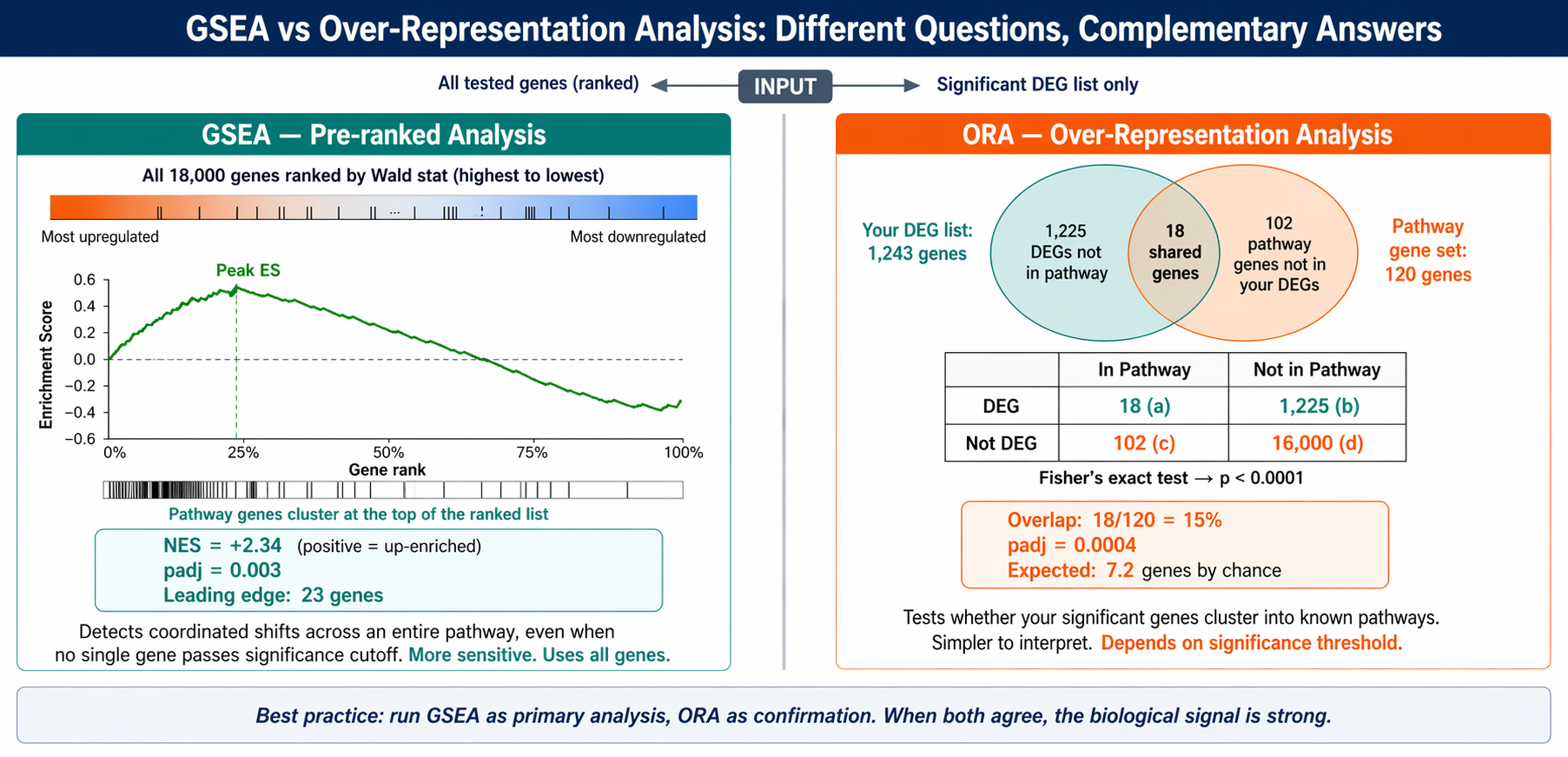
What Is Pathway Analysis in R?
Pathway analysis in R tests whether genes from a known biological process occur unusually often in a selected list or occupy unusual positions in a ranked list.
A pathway database supplies gene sets such as interferon signaling, oxidative phosphorylation, or cell-cycle control. Your experiment supplies measured genes and a statistic such as a DESeq2 Wald score.
The analysis does not prove that a pathway is activated. Set-based enrichment shows representation or rank direction. A causal activation claim needs signed pathway topology, regulator targets, or another model that supports that language.
Should You Use GSEA or ORA?
Use gene set enrichment analysis when every tested gene has a meaningful ranking statistic. Use over-representation analysis when the selected gene list itself is the scientific object you want to explain.
| Decision | GSEA | ORA |
|---|---|---|
| Input | All tested genes in one ranked vector | Selected genes plus tested-gene background |
| Main question | Do pathway genes collect near one end of the ranking? | Does the selected list contain too many pathway genes? |
| Cutoff before testing | No gene significance cutoff | Yes, a defined selection rule |
| Typical R functions | clusterProfiler::GSEA(), fgsea::fgsea() | clusterProfiler::enrichGO(), enricher() |
| Key result | NES, FDR, leading edge | Gene ratio, FDR, overlapping genes |
| Main risk | Bad ranking or duplicated identifiers | Bad background or arbitrary cutoff |
GSEA is usually the stronger primary analysis for RNA-seq because it retains information from genes below a DEG threshold. ORA remains useful when the high-confidence DEG list has a clear interpretation.
For a deeper method comparison, read ORA vs GSEA in R. The rest of this page focuses on the complete pathway analysis workflow in R.
What Data Do You Need for Pathway Analysis in R?
You need a gene-level results table, consistent gene identifiers, a gene-set collection, and either a ranked vector for GSEA or a selected list plus background for ORA.
The examples expect these DESeq2 columns:
gene_id, symbol, baseMean, log2FoldChange, stat, pvalue, padjKeep three objects separate:
ranked_genes: every testable gene, named by one identifier and sorted by a continuous statistic.selected_genes: genes passing a documented effect-size and FDR rule.tested_genes: all genes eligible to enterselected_genes, used as the ORA universe.
Mixing these objects is a common source of incorrect results. The ranked vector is not an ORA background, and a significant-gene list is not a complete GSEA input.
How Do You Install the R Packages?
Install Bioconductor packages once, then load the analysis and annotation packages at the start of the script.
if (!requireNamespace("BiocManager", quietly = TRUE)) {  install.packages("BiocManager")}
BiocManager::install(c(  "clusterProfiler",  "enrichplot",  "fgsea",  "org.Hs.eg.db"))
install.packages(c("msigdbr", "dplyr", "readr", "ggplot2"))library(clusterProfiler)library(enrichplot)library(fgsea)library(msigdbr)library(org.Hs.eg.db)library(dplyr)library(readr)library(ggplot2)Record package versions with sessionInfo() when the analysis is complete. Gene-set releases and package behavior change, so version metadata is part of reproducibility.
How Do You Prepare DESeq2 Results for GSEA?
Build one unique, finite score per gene. The DESeq2 Wald statistic is a useful default because it combines estimated effect direction with its uncertainty.
res <- read_csv("results/deseq2/all_genes.csv", show_col_types = FALSE) |>  filter(!is.na(stat), !is.na(symbol), symbol != "") |>  group_by(symbol) |>  slice_max(order_by = abs(stat), n = 1, with_ties = FALSE) |>  ungroup()
ranked_genes <- res$statnames(ranked_genes) <- res$symbolranked_genes <- sort(ranked_genes, decreasing = TRUE)
stopifnot(  !anyNA(ranked_genes),  !anyDuplicated(names(ranked_genes)),  all(is.finite(ranked_genes)))
Positive values represent one contrast direction and negative values represent the other. Confirm the DESeq2 contrast before interpreting an NES sign. Reversing the contrast reverses the ranking.
Choose one ranking rule before looking at pathways
The Wald statistic is often preferable to log2 fold change alone because noisy, low-count estimates receive less weight. Do not choose between ranking metrics after seeing which one produces the most attractive pathways.
How Do You Run Gene Set Enrichment Analysis in R?
Fetch an MSigDB collection, convert it to a two-column term-to-gene table, and pass it with the ranked vector to clusterProfiler::GSEA().
Get MSigDB Hallmark gene sets
Use the current collection argument in msigdbr. Hallmark is a practical first collection because its sets summarize broad biological states with less redundancy than larger ontologies.
hallmark <- msigdbr(  db_species = "HS",  species = "Homo sapiens",  collection = "H") |>  select(gs_name, gene_symbol) |>  distinct()
term2gene <- hallmark |>  transmute(term = gs_name, gene = gene_symbol)
For mouse, use the appropriate native database or an explicitly documented orthology strategy. Changing capitalization is not a reliable species conversion method.
Run clusterProfiler GSEA
GSEA() accepts custom gene sets through TERM2GENE, so the same workflow can use Hallmark, Reactome, WikiPathways, KEGG-derived collections, or a laboratory-specific GMT file.
set.seed(2026)
gsea_result <- GSEA(  geneList = ranked_genes,  TERM2GENE = term2gene,  minGSSize = 15,  maxGSSize = 500,  pvalueCutoff = 1,  pAdjustMethod = "BH",  eps = 0,  seed = TRUE,  verbose = FALSE)
gsea_table <- as.data.frame(gsea_result) |>  arrange(p.adjust)
write_csv(gsea_table, "results/pathways/gsea_hallmark.csv")
Setting pvalueCutoff = 1 preserves the full tested table for export. Apply the reporting threshold after the run so nonsignificant pathways remain available for audit.
Interpret NES, FDR, and leading-edge genes
NES reports enrichment direction and scales the score for gene-set size. p.adjust controls the false discovery rate across tested sets. core_enrichment lists the leading-edge genes driving the score.
A positive NES means set members collect toward the positive end of your ranking. It does not automatically mean the pathway is mechanistically activated.
Do not read NES without the contrast
NES direction depends on the ranked statistic and contrast order. Write the contrast beside every plot, report FDR with NES, and inspect the leading edge before assigning a biological explanation.
How Do You Run Pathway ORA in R?
ORA compares selected genes with all tested genes. The universe must reflect genes that could have passed the selection rule, not every annotated gene in the organism.
tested_genes <- res |>  filter(!is.na(padj)) |>  pull(symbol) |>  unique()
selected_genes <- res |>  filter(    !is.na(padj),    padj < 0.05,    abs(log2FoldChange) >= 1  ) |>  pull(symbol) |>  unique()
ora_result <- enricher(  gene = selected_genes,  universe = tested_genes,  TERM2GENE = term2gene,  pvalueCutoff = 1,  pAdjustMethod = "BH",  qvalueCutoff = 1)
ora_table <- as.data.frame(ora_result) |>  arrange(p.adjust)
write_csv(ora_table, "results/pathways/ora_hallmark.csv")
Use enrichGO() when you specifically need Gene Ontology and have a compatible OrgDb. Pass universe = tested_genes after mapping both selected and tested genes to the same identifier type.
Run up and down ORA separately when direction matters
A combined DEG list can mix genes changing in opposite directions. If direction is part of the question, run separate ORA tests for upregulated and downregulated genes against the same tested-gene universe.
How Do You Run fgsea Directly in R?
Use fgsea() when you want a direct preranked workflow, a list-column of leading-edge genes, and fine control over the gene-set list.
pathways <- split(hallmark$gene_symbol, hallmark$gs_name)
set.seed(2026)fgsea_table <- fgsea(  pathways = pathways,  stats = ranked_genes,  minSize = 15,  maxSize = 500,  eps = 0) |>  arrange(padj)
write_csv(  fgsea_table |>    mutate(leadingEdge = vapply(      leadingEdge,      paste,      collapse = ";",      FUN.VALUE = character(1)    )),  "results/pathways/fgsea_hallmark.csv")
clusterProfiler::GSEA() can use the fgsea engine, while direct fgsea() returns its own data-table structure. Choose one primary implementation and document it instead of blending fields from separate runs.
How Do You Visualize Pathway Analysis Results?
Start with a dot plot for the result landscape, then inspect an enrichment curve and its leading-edge genes for any pathway you plan to discuss.
p_dot <- dotplot(  gsea_result,  showCategory = 15,  x = "NES",  color = "p.adjust",  size = "setSize",  label_format = 42) +  labs(    title = "Hallmark GSEA",    subtitle = "Treated vs control",    x = "Normalized enrichment score"  ) +  theme_minimal(base_size = 11)
ggsave(  "results/pathways/gsea_dotplot.png",  p_dot,  width = 8,  height = 7,  dpi = 300)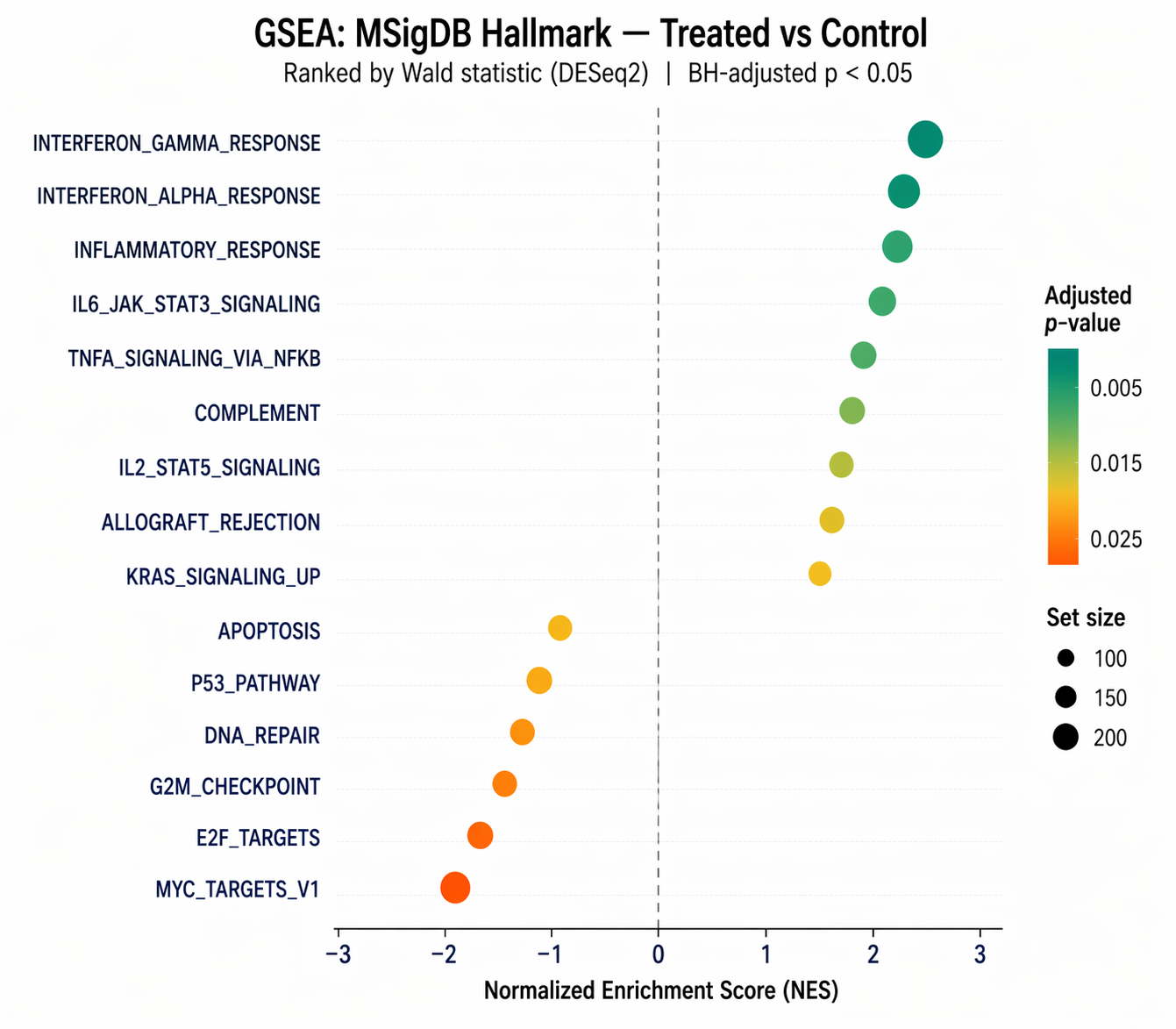
top_pathway <- gsea_table$ID[[1]]
p_curve <- gseaplot2(  gsea_result,  geneSetID = top_pathway,  title = top_pathway,  pvalue_table = TRUE)
ggsave(  "results/pathways/gsea_top_pathway.png",  p_curve,  width = 8,  height = 6,  dpi = 300)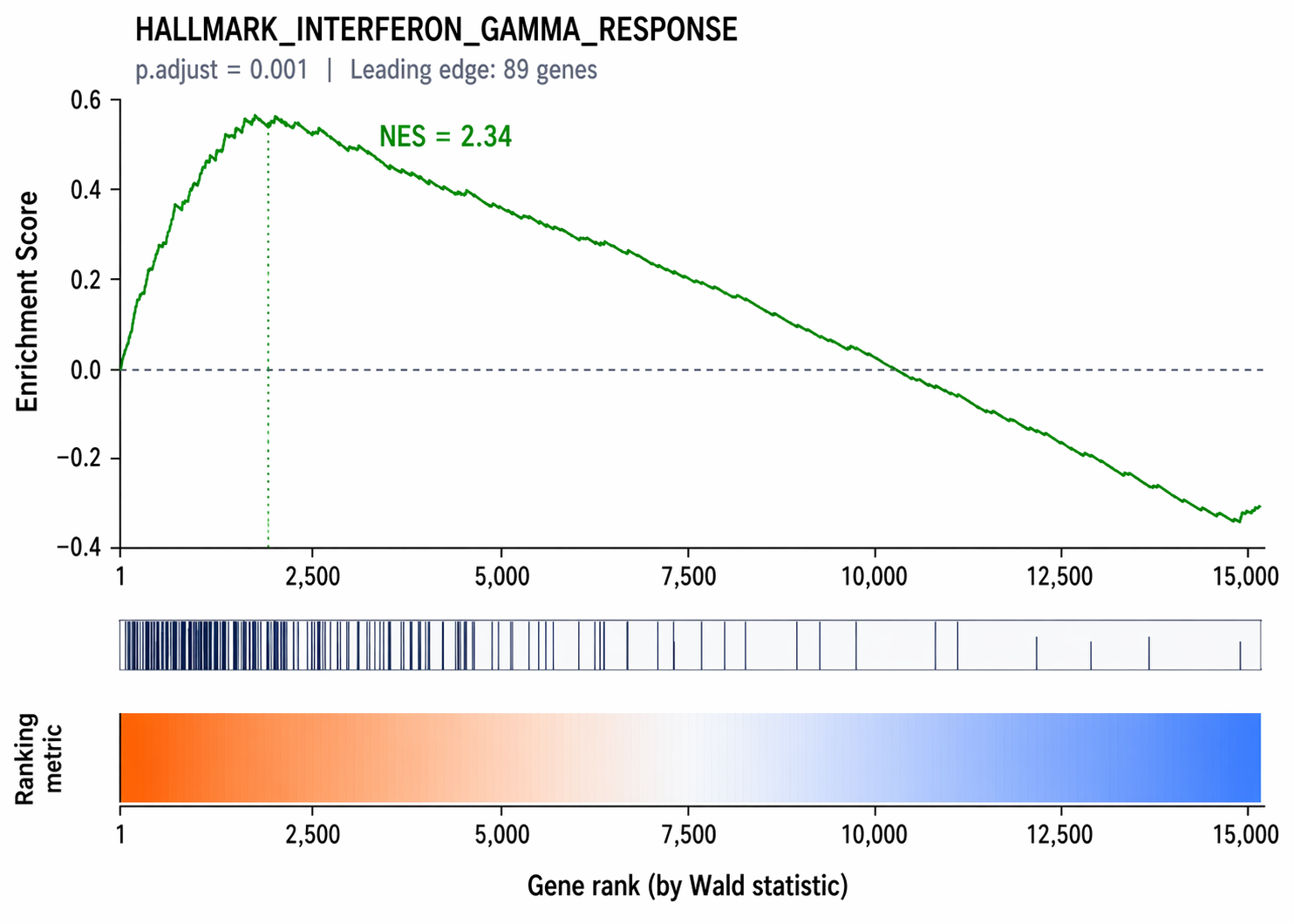
Which Pathway Database Should You Use in R?
Choose the collection that matches the biological question, organism, identifier system, and level of detail. Do not pool every available database simply to increase the number of significant results.
Hallmark is a strong first pass for broad transcriptional programs. Reactome and WikiPathways provide more specific pathway definitions. GO Biological Process offers wide coverage but often returns overlapping terms that need careful summarization.
KEGG-derived sets are widely recognized, but access, naming, and versioning depend on the source used. Record whether the genes came from MSigDB, a package API, a downloaded GMT, or another licensed resource.
The same pathway name can have different members across releases or databases. Save the exact term-to-gene table used for testing, not only the package call that fetched it.
For non-human studies, prefer a species-native collection when available. If ortholog conversion is necessary, report the source species, target species, mapping method, and how one-to-many mappings were resolved.
How Should You Compare GSEA and ORA Results?
Compare GSEA and ORA as complementary tests, not as votes on one universal pathway truth. Agreement strengthens a theme, while disagreement often reveals threshold sensitivity or a diffuse coordinated shift.
A pathway can be significant in GSEA but absent from ORA when many members move modestly in one direction and few pass the DEG cutoff. This is a biologically coherent result, not a failed confirmation.
A pathway can be significant in ORA but weak in GSEA when a small cluster of extreme DEGs overlaps the set while the remaining members are scattered through the ranking. Inspect the overlap genes and set size before interpreting it.
When both methods return the same theme, compare the ORA overlap with the GSEA leading edge. If the same genes drive both results, the explanation is more focused. If different genes drive them, report that distinction.
Never combine GSEA and ORA p-values unless a validated meta-analysis defines the null, dependence structure, and correction. A side-by-side evidence table is usually more honest and easier to audit.
Why Does Pathway Analysis in R Fail?
Most failures come from identifier mismatch, duplicated ranks, the wrong ORA universe, an undocumented contrast, or interpreting a gene-set score as causal pathway activity.
| Symptom | Likely cause | Check |
|---|---|---|
| No pathways returned | Gene IDs do not overlap the collection | Compare names(ranked_genes) with pathway members |
| Duplicate-name warning | Multiple rows map to one symbol or Entrez ID | Keep one documented score per gene |
| Hundreds of broad ORA terms | Selected list is too broad or background is wrong | Audit DEG rule and tested universe |
| NES direction seems reversed | Contrast or ranking sign is reversed | Print the contrast and top ranked genes |
| Results change across runs | Stochastic settings or changing gene-set release | Set a seed and record versions |
| Strong related terms repeat | Gene sets share many members | Cluster terms and inspect overlap |
Do not remove redundant terms only because they look repetitive. Preserve the full table, then create a summarized view with a documented similarity rule. See how to reduce GO term redundancy.
How Does NotchBio Perform Pathway Analysis?
NotchBio keeps the pipeline GSEA run separate from the broader Results Pathways workspace. This matters because the two surfaces answer related but different questions.
The run workflow sends a completed DESeq2 result to fgsea. Users can select Hallmark, curated C2 pathways, and GO Biological Process, choose log2 fold change or signed p-value ranking, and set gene-set size and pathway FDR controls.
The Results Pathways workspace also computes server-side gene-set evidence from saved DESeq2 outputs. It presents over-representation, directional rank-sum evidence with correlation adjustment, member genes, pathway barcodes, and separate topology evidence where a compatible signed graph exists.
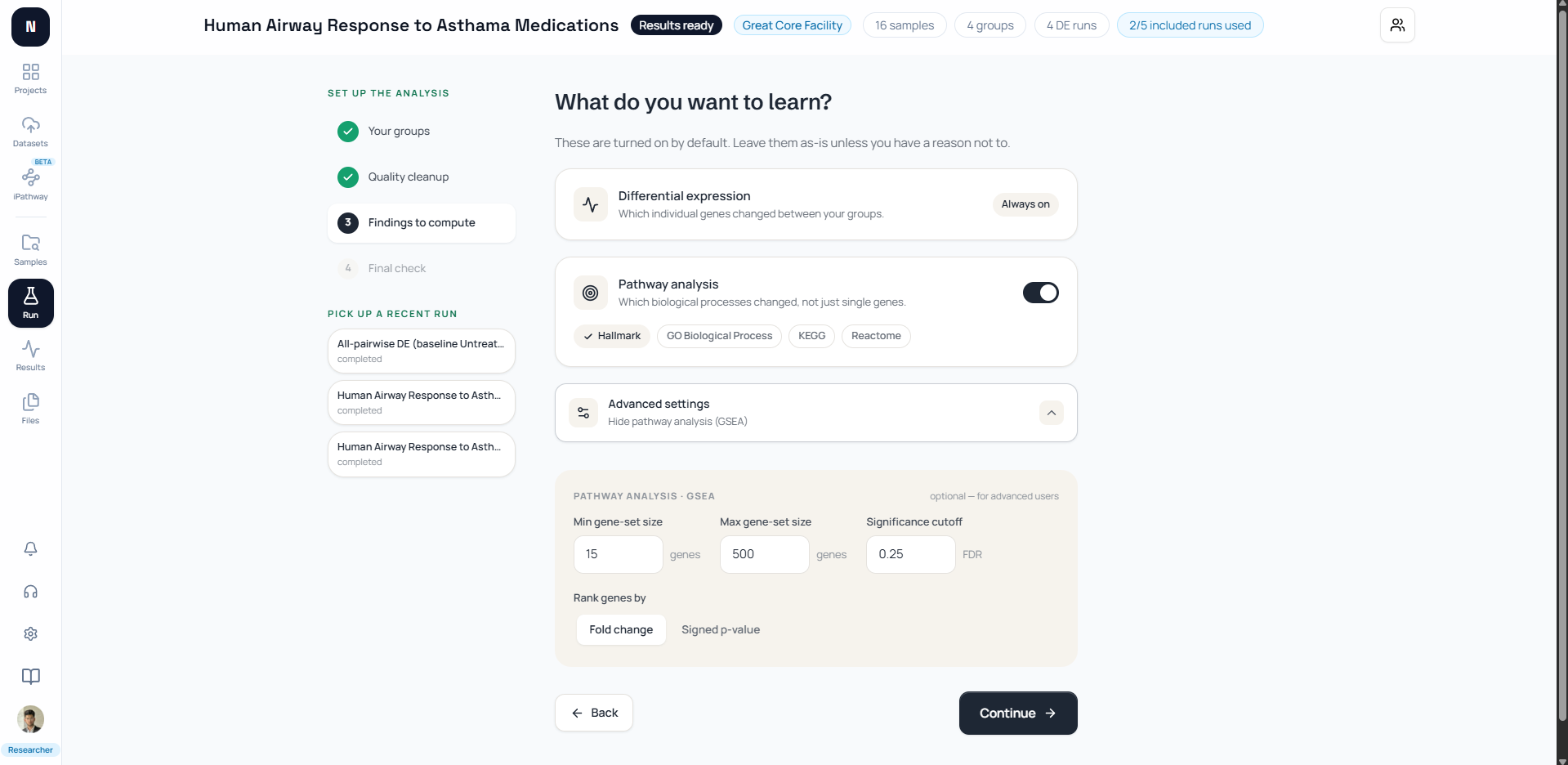
The product does not collapse enrichment and topology into one score. Exact pathway identity is required before those evidence layers are aligned, and unavailable topology is shown as unavailable rather than converted to zero.
For the conceptual sequence, start with What Is Pathway Analysis?, then use How to Interpret Pathway Analysis Results after the code runs.
Pathway Analysis in R: Reproducibility Checklist
A reproducible pathway analysis records the contrast, ranking metric, identifier type, gene universe, gene-set source and release, size filters, statistical method, FDR correction, seed, package versions, and exported full result table.
- Confirm the numerator and denominator of the contrast.
- Keep one unique score per gene identifier.
- Use every eligible tested gene as the ORA universe.
- Report NES or overlap together with FDR.
- Inspect leading-edge or overlap genes before interpreting a pathway.
- Save nonsignificant rows for audit.
- Treat enrichment as association, not causal activation.
- Run
sessionInfo()and archive the output.
Primary References
The workflow follows the clusterProfiler documentation, the fgsea Bioconductor package, and the current msigdbr reference.
For methods, cite the original GSEA paper by Subramanian and colleagues and the clusterProfiler 4.0 paper when those tools support the reported analysis.
Further reading
Read another related post
GO Enrichment Analysis Mistakes: Backgrounds, FDR, and Bias
A 2022 PLOS Computational Biology study found 43% of GO enrichment analyses skip multiple test correction. Here is what that means and how to do it right.
BioinformaticsRNA-Seq Analysis Without a Bioinformatician: What to Automate
If your lab sequences more than it analyzes, here is what self-service RNA-seq looks like, what is safe to automate, and where you still need a human.
TutorialSTAR vs Salmon vs HISAT2: A Hands-On Benchmark
A hands-on RNA-seq aligner benchmark: working STAR, Salmon, and HISAT2 commands, real runtime and memory numbers, and how much the DEG list actually changes.