What Are Batch Effects in RNA-Seq (and Why They Ruin Results)
You run your RNA-seq experiment twice because your first batch only had three replicates per group and the reviewer wanted six. Fair enough. You sequence the new samples, merge everything into one counts matrix, and run DESeq2. The PCA plot looks strange. Your samples cluster by sequencing date, not by biological condition. Congratulations: you have a batch effect.
This is one of the most common and most quietly destructive problems in bulk RNA-seq. It does not throw an error. Your pipeline finishes cleanly. But the genes you call as differentially expressed may have more to do with which week your samples were processed than with your actual biology. If you want a refresher on how those expression matrices get built in the first place, read Raw Reads to Counts: The Bulk RNA-Seq Pipeline Explained and What Is a Count Matrix and Why Does It Matter.
This post is the conceptual primer: what batch effects are and why they wreck results. When you are ready to act on them, Detecting Batch Effects with PCA and Correcting Them in DESeq2 is the hands-on detection-and-fix guide, and Batch Effect Correction Tools: ComBat-Seq vs RUVSeq vs sva compares the correction methods in depth.
What Batch Effects Actually Are
A batch effect is systematic technical variation introduced when samples are processed in separate groups. The sources are mundane: different library prep days, different technicians, different lots of reagents, different lanes on the sequencer. Each of these introduces a consistent offset in expression measurements across thousands of genes.
The problem is not that technical variation exists. Every assay has noise. The problem is that batch effects are correlated with large numbers of genes simultaneously, which makes them look like real biological signal to any statistical test that does not account for them.
I have seen experiments where the top 50 differentially expressed genes were entirely driven by the fact that all control samples were processed in January and all treatment samples were processed in March. The biology was real, but it was buried under a technician’s vacation schedule.
How to Spot Them
The fastest diagnostic is a PCA plot of your normalized counts. If your samples separate by batch on PC1 or PC2 instead of by your condition of interest, you have a problem. This should be one of the first things you check after quantification.
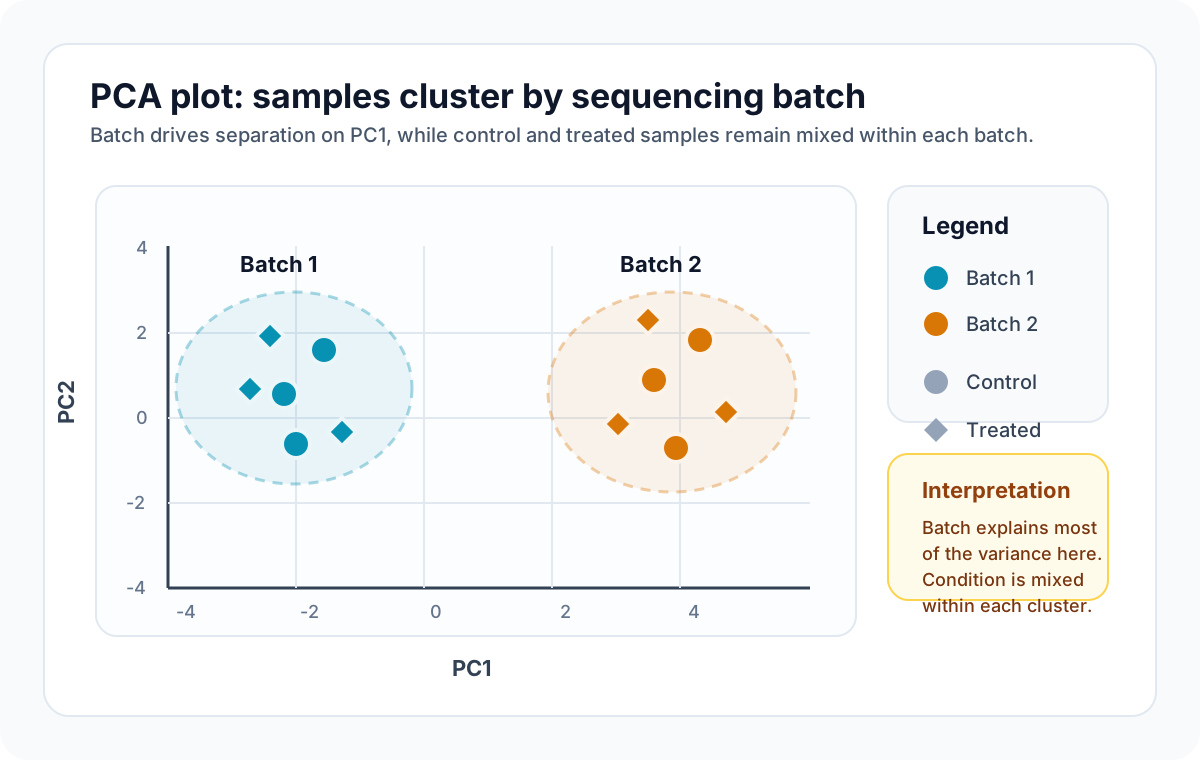
Beyond PCA, you can look at hierarchical clustering dendrograms or compute the silhouette score of your samples grouped by batch versus grouped by condition. If the batch grouping produces a tighter cluster than the biological grouping, your downstream results are suspect.
A subtler version of this problem shows up when batch is partially confounded with condition. If all your treated samples happen to come from batch 1 and all your controls from batch 2, no statistical method can separate the batch effect from the treatment effect. That is a study design failure, not an analysis problem, and no amount of correction will fix it. This is the same failure mode described in Experimental Design Mistakes That Kill Your Differential Expression Analysis, just viewed from the batch-correction side instead of the planning side.
Confounded designs cannot be rescued
If batch and condition are perfectly confounded, correction methods will either fail outright or produce misleading results. The only real fix is to rerun the experiment with proper randomization.
Correction Methods That Work
Three approaches see the most use in practice, and each has a different philosophy.
ComBat (from the sva package in R) uses an empirical Bayes framework to estimate and remove batch effects. It works well when you have a known batch variable and a reasonable number of samples per batch. You apply it to your normalized expression matrix before differential expression testing. ComBat is aggressive, which is both its strength and its risk: if your batch variable is even slightly confounded with biology, ComBat will remove some of the biological signal along with the batch effect.
limma’s removeBatchEffect takes a lighter touch. It fits a linear model that includes batch as a covariate and returns the residuals. This is useful for visualization (corrected PCA plots, heatmaps) but is not meant to produce a corrected matrix for downstream statistical testing. For differential expression with limma, the better approach is to include batch directly in your design matrix and let the model handle it.
SVA (Surrogate Variable Analysis) is for situations where you suspect hidden batch effects that you cannot directly measure. It estimates latent variables (surrogate variables) from the data and adds them as covariates in your model. This is powerful when your metadata does not capture all sources of technical variation, but it requires care in interpretation because the surrogate variables are abstract and do not map to any specific physical cause.
| Method | Best for | Risk |
|---|---|---|
| ComBat | Known batches, clean separation from biology | Can remove biological signal if confounded |
| removeBatchEffect | Visualization after correction | Not suitable for corrected DE testing |
| SVA | Unknown or hidden batch effects | Surrogate variables are hard to interpret |
The Design Matrix Approach
For most standard differential expression analyses with DESeq2 or limma, the cleanest approach is not to “correct” the batch effect at all. Instead, include batch as a covariate in your design formula:
# DESeq2 example: batch as covariatedds <- DESeqDataSetFromMatrix( countData = count_matrix, colData = sample_metadata, design = ~ batch + condition)This tells the model to estimate and account for batch variation while testing for the effect of condition. It avoids the two-step problem of correcting first and then testing, which can distort variance estimates. In my experience, this is the most reliable approach when you have a well-recorded batch variable and your batches are not confounded with your condition.
The catch is that you need your batch variable in your metadata. If you did not record which samples were processed together, you cannot use this approach. This is why good experimental documentation matters as much as good analysis code.
Record everything during sample processing
Track the date of library prep, the reagent lot, the technician, and the sequencer lane for every sample. You may not need all of it, but you cannot go back and get it later.
When Correction Goes Wrong
Overcorrection is a real risk. I have reviewed analyses where the researcher applied ComBat, then included batch in the DESeq2 design formula, effectively removing the batch effect twice. The result was a suspiciously clean PCA plot and a list of DE genes with artificially low p-values. If your corrected data looks too good, it probably is.
Another failure mode: applying batch correction to a dataset where the batch effect is smaller than the biological effect. In this case, correction can introduce noise rather than remove it. Always compare your PCA plots before and after correction. If the before plot already shows clean separation by condition, you may not need correction at all.
Practical Recommendations
Start every analysis by plotting PCA colored by every metadata variable you have: condition, batch, sex, age, RIN score, sequencing depth. If batch jumps out, deal with it. If it does not, move on.
For most cases, including batch in the design formula is sufficient and safe. Reserve ComBat and SVA for situations where you need corrected matrices for visualization or where batch effects are hidden.
Platforms like NotchBio build QC checks and batch diagnostics into the automated pipeline, which means you catch these issues before they propagate into your DE results. That early detection step is often more valuable than any post hoc correction.
Wrapping Up
Batch effects are not a sign that your experiment failed. They are a normal consequence of processing biological samples across time and conditions. The real failure is ignoring them. Check for them early, design your experiments to avoid confounding, and choose the correction method that fits your situation rather than defaulting to the most aggressive option.
If you run bulk RNA-seq regularly and want automated batch diagnostics built into your workflow, NotchBio handles this as part of its standard pipeline. It is worth a look if you are tired of writing the same QC scripts for every new project.
Further reading
Read another related post
Why Your Choice of Reference Genome Changes Your Results
GENCODE, Ensembl, UCSC, and RefSeq annotate the same genome differently. How that choice changes RNA-seq alignment, quantification, and your DEG list.
TutorialTrimming Adapters with Trimmomatic and fastp
When adapter trimming helps, when it hurts, and how to run Trimmomatic and fastp on RNA-seq data with the parameter choices that actually matter.
TutorialHow to Run FastQC and MultiQC on Raw RNA-Seq Reads
A hands-on guide to automating RNA-seq QC across dozens of samples using FastQC and MultiQC, with bash and Python scripts for parsing and flagging failures.