Import from NCBI, ENA, or DDBJ archives
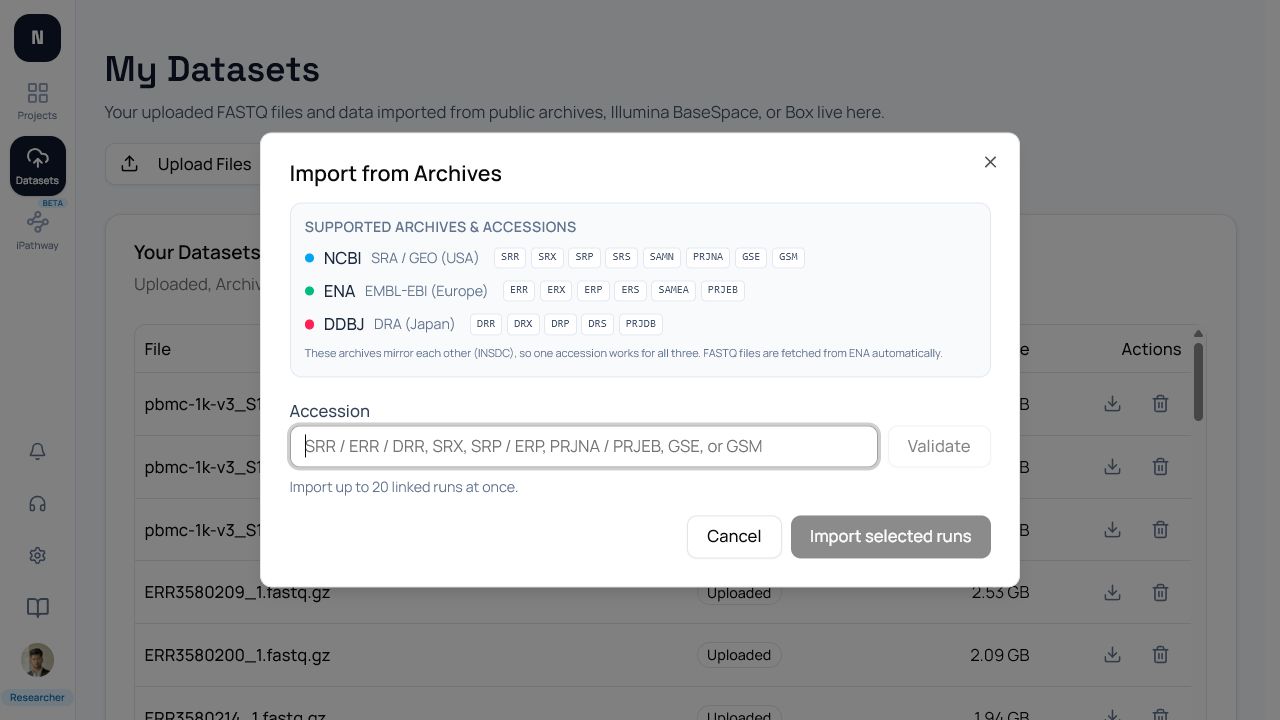
The archive importer accepts public INSDC identifiers and retrieves FASTQ files through ENA mirrors when available. It can resolve up to 20 linked runs per import.
Need the files locally without signing in? The public GEO FASTQ Downloader accepts GSE, GSM, and the supported archive accessions below. Expand a run to download one ENA FASTQ, or save one resumable downloader package for the complete selection. The package contains instructions, checksums, and scripts—not the FASTQ data itself—and local downloads do not use a NotchBio import allowance.
Supported accession families
Section titled “Supported accession families”| Record type | Supported prefixes |
|---|---|
| Runs | SRR, ERR, DRR |
| Experiments | SRX, ERX, DRX, CRX |
| Studies and projects | SRP, ERP, DRP, PRJNA, PRJEB, PRJDB |
| Samples | SRS, ERS, DRS, CRS, SAMN, SAMD, SAMEA, SAMEG |
| GEO records | GSE, GSM |
Submission accessions, analysis accessions, GPL, and GDS records are not downloadable sequencing-run identifiers supported by this importer.
Validate before entering an accession
Section titled “Validate before entering an accession”- Search the accession in the NCBI SRA hierarchy and confirm it links to sequencing runs rather than only processed data.
- For GEO, inspect the GEO accession viewer and look for a linked SRA study or run. A
GSEcan describe a microarray or processed-data series with no FASTQ files. - Check one or more run records in an ENA file report. The report should contain
fastq_ftp, file size, and checksum fields; see the ENA file-report documentation. - Confirm organism, assay, platform, layout, and sample metadata match your experiment. NotchBio does not promise that every resolved record is RNA-seq.
Resolve and select runs
Section titled “Resolve and select runs”Paste one supported accession into Import from Archives and resolve it. Review the returned run table before selecting anything. Paired-end runs show their layout and linked files; runs already in your account are marked Already downloaded and cannot be selected again. Use pagination when the accession links to many runs, then select only the runs you need.
Why a valid accession can fail
Section titled “Why a valid accession can fail”An accession can pass syntax validation and still fail because:
- the record has no linked SRA runs, as can happen with processed GEO or array studies;
- the run metadata exists but ENA has no
fastq_ftpfiles yet; - the sequence data is controlled-access rather than public;
- the archive mirror has not synchronized the files;
- the record is a different assay or organism than expected.
Resolution is not the same as successful download. During import, NotchBio downloads the FASTQ files, verifies checksums when supplied, and reports a terminal failure if no downloadable FASTQ is available.
After import
Section titled “After import”Wait for the import to reach Completed, open the dataset, and inspect sample names and read layout. Then add the dataset to a project and create groups. A failed import can be retried after you correct the accession or choose a different run.