Configure a run
The run wizard has four stages.
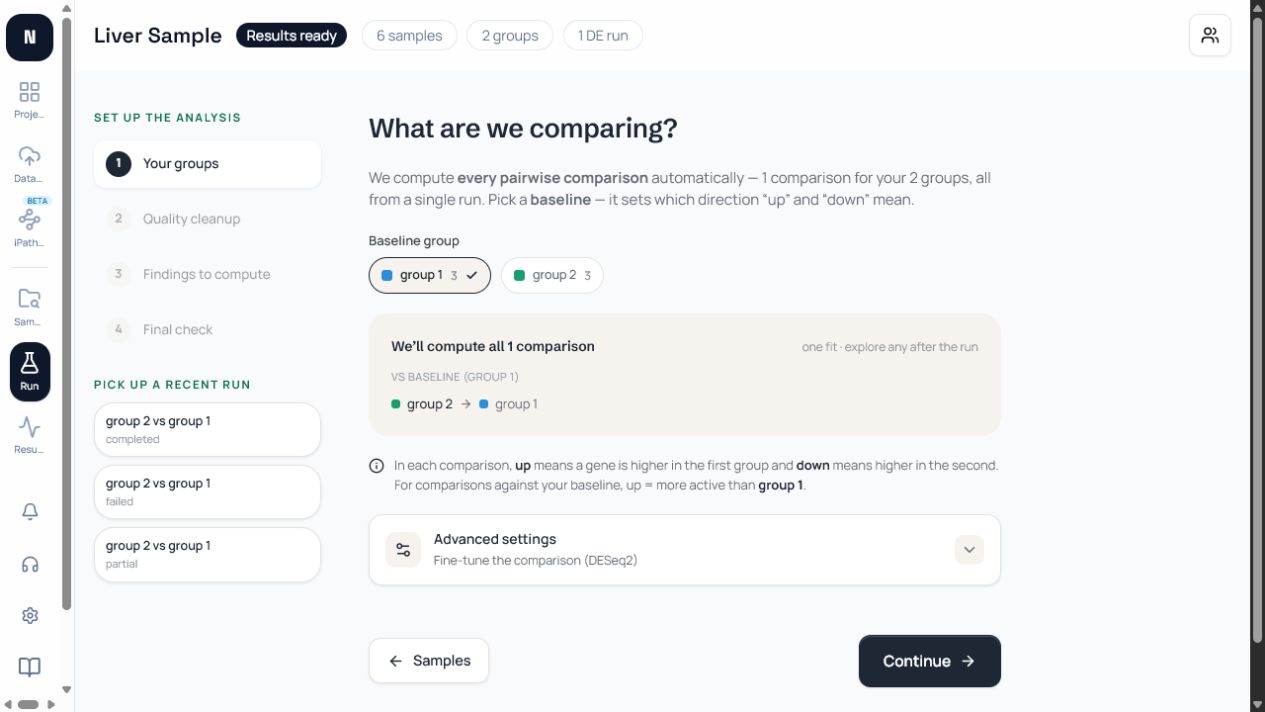
1. Your groups
Section titled “1. Your groups”Choose the baseline group and select comparisons. You can include all pairwise comparisons or only the contrasts that answer the experiment. Review the up/down meaning shown by the wizard.
2. Quality cleanup
Section titled “2. Quality cleanup”Choose Gentle, Recommended, or Thorough cleanup. Advanced settings expose the fastp quality threshold, minimum length, end trimming, poly-G/poly-X trimming, and custom adapters. Choose Salmon for transcript-level quantification or STAR + featureCounts when you need alignment and gene-level counting.
3. Findings to compute
Section titled “3. Findings to compute”Differential expression is always included. Pathway analysis is optional and can include Hallmark, GO Biological Process, KEGG, and Reactome sets. Advanced GSEA controls include gene-set size limits, FDR, and ranking choices.
4. Final check
Section titled “4. Final check”Name the run and review the baseline, comparison, cleanup, quantification method, DESeq2 settings, pathway selection, and estimated time. Launch only when this summary matches the analysis plan.